Audiee.ai for developers
Audiee.ai gives your coding agent the meetings it was not in. A local MCP server exposes your meetings, notes and connected services as tools to Claude Code, Cursor and Claude Desktop; underneath it is a folder of Markdown you can grep. No bot joins your standup, and the whole thing runs on a Mac, Apple silicon or Intel.
What you get on disk
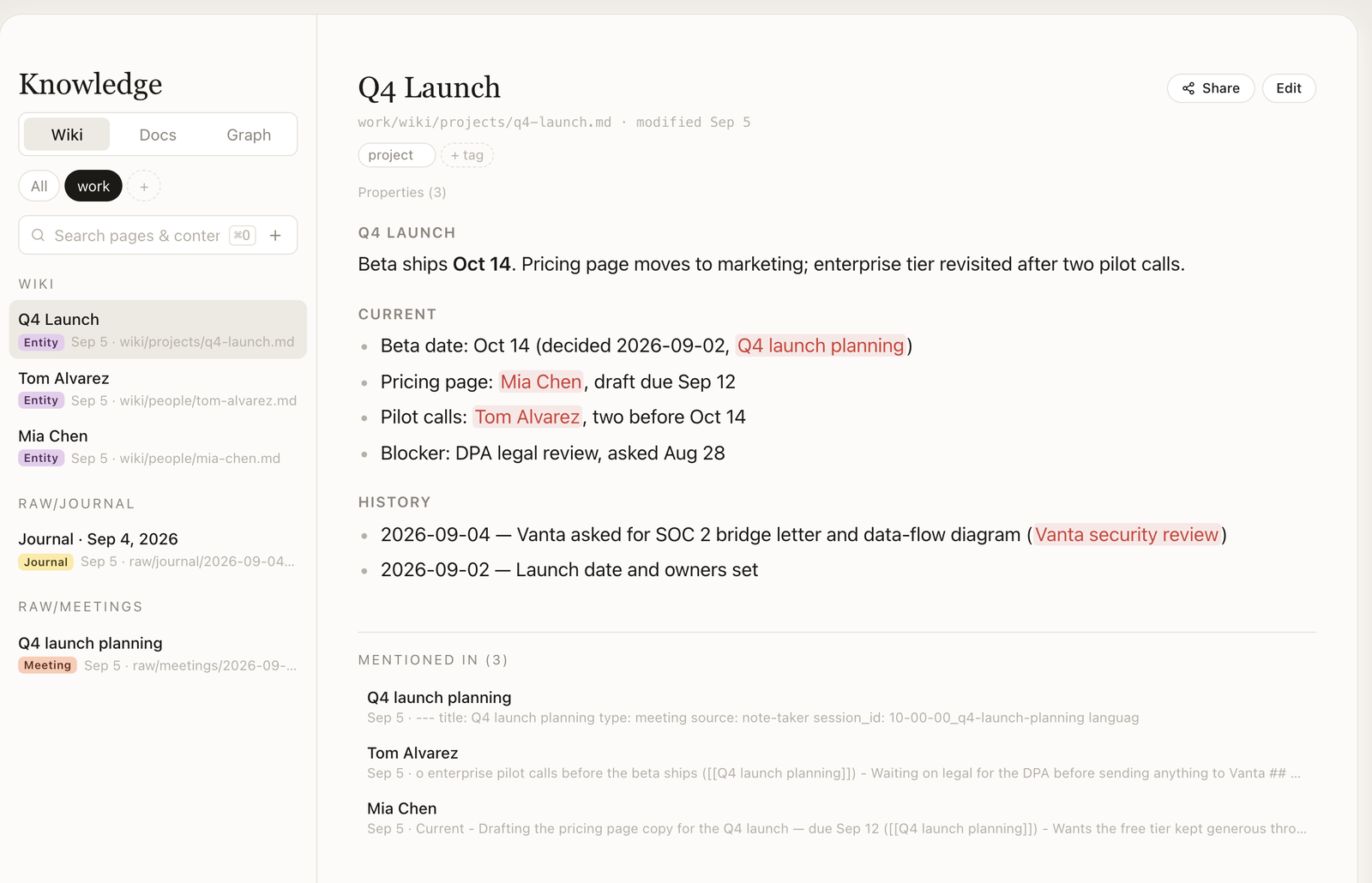
~/.audiee/wiki/ — one Markdown page per meeting, person, project and daily note, with front-matter properties and [[wikilinks]]. ~/.audiee/data/ — meeting folders: transcript with timestamps, summary, a JSON sidecar with action items, waiting-on and follow-ups, each carrying a [@mm:ss] anchor into the transcript. Delete the app and the files still parse.
What you get over MCP
wiki__search,wiki__read_page,wiki__write_page,wiki__list_pages,wiki__grep— the knowledge base as tools.wiki__searchis BM25 full-text search over a SQLite FTS5 index (phrase, boolean, prefix and field-scoped queries); the on-device semantic search lives in the app's own Ask and is not exposed over MCP.note-taker__past_meetings,note-taker__get_session,note-taker__start_session,note-taker__end_session,note-taker__finalize_meeting— list, read, start and finish meetings from the agent.- Connected services as tools when you connect them: Slack, Google and Apple Calendar, Notion, Google Drive/Docs/Sheets, Apple Reminders, GitHub, Telegram.
- Auto-configured for Claude Desktop, Claude Code and Cursor: Audiee.ai writes its entry into their config on first run; restart the client and the tools are there.
Three things developers actually do with it
- Decisions next to the diff. In Cursor or Claude Code: "what did we decide about the rate limiter on Tuesday?" —
wiki__searchreturns the decision with the meeting it came from, and the change matches what was agreed rather than what someone remembers. - The whole meeting as a task. One click on a finished meeting hands Claude Code a fully briefed task: transcript, summary, action items. Minutes, the follow-up email, the ticket descriptions come back without pasting anything.
- Your own servers in the same pool. Plug Linear, an internal tool or a filesystem server into Settings → MCP servers; Audiee.ai's assistant can use them alongside your meetings. Say "file the three action items from today's planning as Linear issues" and watch the held-action prompt before it does.
How the audio path works, for the sceptical
The daemon captures system audio and the mic via macOS APIs (Screen & System Audio Recording plus Microphone permissions) and streams PCM to a speech provider, chosen by language. English, Mandarin, Cantonese, Vietnamese, Thai, Indonesian, Malay and Filipino meetings, and Mandarin, Cantonese, Mixed, Thai, Indonesian, Malay and Filipino dictation, go to a CJK-first speech model in Singapore through Audiee.ai's gateway, which holds the key. Meetings in the other ten languages, and English, Vietnamese or other dictation, go to a streaming speech provider in the United States over a direct WebSocket from your Mac, authenticated with a short-lived token the gateway mints per session; the gateway relays that stream only if the direct connection fails. Text comes back; no copy of audio or transcript is kept on our servers. Summaries are written by an LLM from the transcript text, through the gateway. No long-lived provider key lives on your Mac; the whole list of services is on the trust page, and we will walk any evaluator through the routing code on request.
Honest limits
- Not offline: audio and transcript text leave the Mac. If you need an on-device model, run MacWhisper for transcription and use Audiee.ai for the rest, or skip Audiee.ai.
- No usage log of MCP tool calls leaves the Mac since daemon 0.1.7 (older daemons sent metadata plus truncated search queries to our gateway, which discarded it unread). The connect/disconnect ping per MCP session is off by default too since daemon 0.1.9; the trust page has the exact fields of both. If we ever want either set of data, it will be opt-in with a Settings switch first.
- macOS 13+ only. No Linux, no Windows, no CLI-only install.
Questions developers ask
Is the MCP server remote or local?
Local: a daemon on 127.0.0.1 that the desktop app supervises. Clients talk to it over stdio via a small bridge or over HTTP on localhost. Nothing about your meetings is reachable from outside your Mac.
Can I skip MCP and just read the files?
Yes. ~/.audiee/wiki is plain Markdown with front-matter and [[wikilinks]]; meetings are folders with transcript, summary and a JSON sidecar. grep, ripgrep, Obsidian and your agent's file tools all work.
Which languages does the Mixed mode cover?
English, Mandarin and Cantonese in one stream; a sentence can switch mid-way. Other languages are supported for dictation one at a time.
Can Audiee.ai call my own MCP servers?
Since 0.1.47, yes: Settings → MCP servers takes a remote Streamable HTTP or SSE URL (optional bearer token) or a local stdio command, and those tools join the assistant's pool. Results from external servers are treated as untrusted content by the assistant's provenance gate.
Is it open source?
Not today. The trust page lists every outbound flow and we will share the audit payload struct, redaction rules and provider routing with anyone evaluating Audiee.ai — email hello@audiee.ai.